Voice Caddie Laser Fit Golf GPS Laser Rangefinder: A Complete Guide

Choosing the right club can feel surprisingly difficult when you are standing 150 yards from the green and the flag looks smaller than you expected. You may have the right swing, the right ball, and plenty of confidence, but if your distance is wrong, the shot can still finish well short or fly over the green.
That is where a golf rangefinder can make a difference.
The Voice Caddie Laser Fit Golf GPS Laser Rangefinder is designed for golfers who want quick distance measurements without carrying a large device. It combines a compact design with 6× magnification, Pin Tracer, slope functionality, and an unusual Ball-to-Pin feature that lets you calculate the distance between the ball and the flag without standing directly beside the ball.
But there is an important detail you should understand before buying it: despite the search-friendly product name sometimes used for this model, the Laser FIT is not a GPS course-mapping rangefinder. Voice Caddie’s own comparison information lists the Laser FIT without built-in GPS, course layout, or GPS Pin Assist.
So, what does the Voice Caddie Laser FIT actually offer, and is it the right type of rangefinder for your game?
Let’s take a closer look.
Table of Contents
What Is the Voice Caddie Laser Fit Golf GPS Laser Rangefinder?
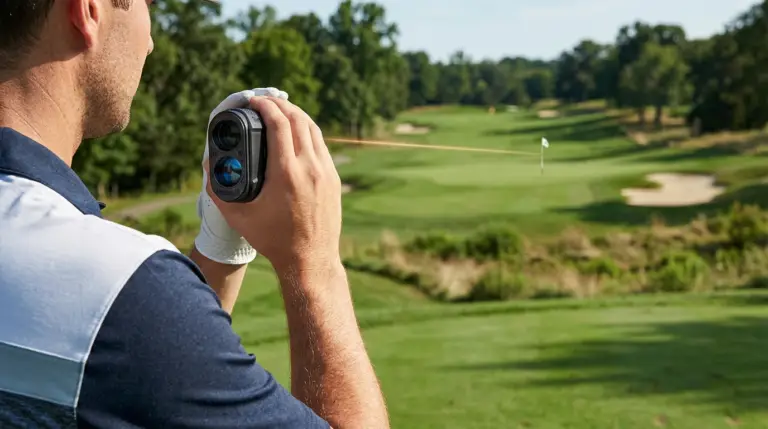
The Voice Caddie Laser FIT is a compact laser golf rangefinder designed to give you accurate yardages to targets on the course.
Instead of relying on GPS coordinates, a laser rangefinder measures the distance to a physical target by sending a laser toward it and calculating the return. This makes laser technology particularly useful when you want to know the exact distance to a flag, bunker, tree, hazard, or another visible target.
Voice Caddie lists the Laser FIT with a 5-to-800-yard measuring range and stated accuracy of ±1 yard. It also weighs only 4 ounces and measures 3.39 × 1.48 × 2.21 inches.
Is the Voice Caddie Laser FIT Actually a GPS Rangefinder?
This is worth clarifying because it can easily cause confusion when you are researching the product online.
The Laser FIT does not include the GPS course mapping features found on Voice Caddie’s higher-end hybrid models. The company’s comparison chart specifically shows the Laser FIT without:
- Active Hybrid GPS/Laser functionality
- GPS Pin Assist
- Course layout and yardage
- Color touchscreen
- Putt View
Instead, it focuses on laser distance measurement, Ball-to-Pin, Pin Tracer, slope, and shot-distance measurement.
Therefore, if you want hole maps and GPS-based distances, you should look at a hybrid model such as the Voice Caddie SL3. If you primarily want a lightweight laser rangefinder, the Laser FIT takes a much simpler approach.
Voice Caddie Laser FIT Specifications at a Glance
| Feature | Voice Caddie Laser FIT |
|---|---|
| Type | Laser golf rangefinder |
| Magnification | 6× optical |
| Measuring range | 5–800 yards |
| Stated accuracy | ±1 yard |
| Weight | 4 oz |
| Dimensions | 3.39 × 1.48 × 2.21 inches |
| Battery | Rechargeable Li-Polymer 500mAh |
| Display | Dual display |
| Slope | Yes |
| Tournament mode | Yes |
| Ball-to-Pin | Yes |
| Pin Tracer | Yes |
| Shot distance measurement | Yes |
These specifications come from Voice Caddie’s current product information.
Voice Caddie Laser FIT Key Features
Ball-to-Pin Mode
Ball-to-Pin is probably the feature that makes the Laser FIT particularly interesting.
Normally, when you use a laser rangefinder, you stand near your ball and point the device toward the flag. But what happens if you are still sitting in a golf cart, your ball is several yards away, or you are playing under cart-path-only restrictions?
Ball-to-Pin gives you another option.
You can measure the ball and then the pin from your current location. The rangefinder calculates the distance between the two points. Voice Caddie designed this feature to provide distance guidance without requiring you to stand directly beside the ball.
How Ball-to-Pin Works
The basic process is straightforward:
- Activate Ball-to-Pin mode.
- Aim at your golf ball and take a measurement.
- Aim at the flag or target.
- Take the second measurement.
- The Laser FIT calculates the distance between the two points.
Independent testing has also found this feature useful in real-world situations. Plugged In Golf reported that Ball-to-Pin measurements performed very closely to direct measurements in its testing.
This can be especially useful when:
- You are playing a cart-path-only hole.
- Your ball is far from the cart.
- You want to help a playing partner with a yardage.
- You want to measure between two visible points.
- You want to save time before walking toward your ball.
Pin Tracer Technology
Finding the flag isn’t always easy.
Sometimes trees, bushes, bunkers, or other objects sit behind the pin. If your rangefinder locks onto the wrong object, the number you receive may be completely different from the distance you actually need.
The Laser FIT includes Pin Tracer, which helps you identify the flag.
According to Voice Caddie, you can hold the Measure button and scan around the pin for up to three seconds. The system automatically detects the pin and provides a measurement, with vibration helping confirm the target lock.
In practical terms, this means you don’t always have to perfectly line up the flag on your first attempt.
Independent reviews have also praised the speed of the Laser FIT’s pin acquisition and vibration feedback.
0.1-Second Spot Measurement
Speed matters when you are trying to maintain your rhythm on the course.
Voice Caddie claims that its Spot Measuring technology can provide a measurement in 0.1 seconds.
That can be useful when you want to quickly check:
- The distance to a bunker
- A tree or layup point
- A hazard
- The flag
- Another target before choosing your club
The faster you can get reliable distance information, the less time you spend standing over your equipment and the more quickly you can focus on your shot.
Slope Integration and Tournament Mode
Elevation changes can make a big difference to how a shot plays.
A 150-yard uphill shot doesn’t necessarily require the same club choice as a flat 150-yard shot. Likewise, a downhill shot can effectively play shorter.
The Laser FIT includes slope functionality that provides adjusted distance information. Voice Caddie explains that its slope system considers terrain characteristics when calculating the adjusted distance.
Tournament Mode
If you play competitive golf, you also need to understand when slope information is permitted.
The Laser FIT includes a tournament mode that allows its slope function to be disabled. Voice Caddie confirms that tournament mode is available on the device.
However, you should always check the rules of your specific competition before using a rangefinder. Tournament conditions can determine which features are permitted.
Compact Design and Portability
One of the biggest advantages of the Laser FIT is its size.
At just 4 ounces, the rangefinder is small enough to fit comfortably into a pocket or a compact golf bag compartment. Its dimensions are 3.39 × 1.48 × 2.21 inches.
That makes it particularly interesting if you walk the course and don’t want additional weight in your golf bag.
Independent testing has also highlighted the compact size as one of the product’s major strengths.
6× Optical Magnification
The Laser FIT uses 6× optical magnification, allowing you to bring distant targets closer through the viewfinder.
This can help when you are trying to identify a flag or another target farther down the fairway.
However, magnification doesn’t eliminate the need for good aiming technique. If you struggle to hold the rangefinder steady or identify the correct target, you may still need more than one measurement.
How Accurate Is the Voice Caddie Laser FIT?
Voice Caddie lists the Laser FIT with an accuracy of ±1 yard and a measuring range of 5 to 800 yards.
For normal golf situations, this gives you plenty of range.
You should remember, however, that the maximum advertised range doesn’t mean every target will be equally easy to measure at 800 yards. Target size, surface, visibility, weather, and your ability to hold the device steady can all influence target acquisition.
Independent testing has generally reported consistent and fast measurements, while also noting that the flag can occasionally require additional aiming.
What Can You Measure?
You can use the Laser FIT to measure visible targets such as:
- Flagsticks
- Trees
- Bunkers
- Hazards
- Layup points
- Other objects on the course
- Shot distances
This flexibility is one of the biggest differences between using a laser rangefinder and relying only on GPS distances.
Battery and Charging
The Laser FIT uses a rechargeable 500mAh Li-Polymer battery. Voice Caddie includes a USB cable with the device.
For your rounds, the simple habit is to charge the rangefinder before heading to the course.
You should also:
- Recharge it after extended use.
- Avoid leaving the battery completely depleted for long periods.
- Keep the charging connection clean and dry.
- Store the rangefinder safely between rounds.
Because the battery is rechargeable, you don’t have to regularly replace disposable batteries.
How to Use the Voice Caddie Laser FIT on the Course
Using the standard laser function is simple.
Step 1: Turn on the Rangefinder
Press the power/measure button to activate the device and bring up the aiming display.
Step 2: Find Your Target
Look through the viewfinder and aim at your intended target.
Step 3: Measure the Distance
Press the measurement button to obtain the distance.
Step 4: Confirm the Target
If you are measuring the flag, use Pin Tracer when necessary to help confirm that the device has locked onto the correct target.
Step 5: Consider the Slope
If slope mode is enabled and permitted, use the adjusted distance as another piece of information when deciding on your club.
The goal isn’t simply to collect numbers. You want to use the information to make a more confident decision.
Voice Caddie Laser FIT vs. a Golf GPS Rangefinder
The biggest difference is how the two technologies provide information.
| Feature | Laser FIT | GPS Rangefinder |
|---|---|---|
| Laser target measurement | Yes | Usually no |
| GPS course maps | No | Usually yes |
| Exact visible target measurement | Yes | Usually estimated |
| Flag targeting | Yes | Depends on model |
| Slope | Yes | Depends on model |
| Hole layout | No | Often available |
| Hazards/course overview | Limited to visible targets | Often available |
| Ball-to-Pin | Yes | Not normally the same system |
| Portability | Very compact | Depends on device |
When a Laser Rangefinder Makes Sense
A laser may suit you if you prefer:
- Precise measurements to visible targets
- Fast distance readings
- A compact device
- Flag targeting
- Slope-adjusted information
- Simple operation
When GPS May Be More Useful
A GPS device may make more sense if you want:
- Complete hole layouts
- Hazard information
- Front, middle, and back green distances
- Course mapping
- A broader view of the hole
If you want both technologies in one device, Voice Caddie’s SL3 is positioned as a hybrid GPS/laser model, unlike the Laser FIT.
Pros and Cons of the Voice Caddie Laser FIT
| Advantages | Things to Consider |
|---|---|
| Very lightweight at 4 oz | No built-in GPS course mapping |
| Compact design | No hybrid GPS functionality |
| Ball-to-Pin mode | No built-in magnet |
| Pin Tracer | Requires visible targets |
| Slope functionality | Slope may not be permitted in some competitions |
| 6× magnification | Flag may sometimes require additional aiming |
| Rechargeable battery | Needs to be charged |
| Stated ±1-yard accuracy | Real-world target acquisition varies |
Voice Caddie’s comparison page confirms that the Laser FIT lacks a built-in magnet, GPS course layout, GPS Pin Assist, and active hybrid GPS/laser functionality.
Who Is the Voice Caddie Laser FIT Best For?
The Laser FIT can make sense if you want a lightweight rangefinder that concentrates on the basics of laser distance measurement while adding some useful features.
Golfers Who Walk
At only 4 ounces, the device won’t add much weight to your equipment.
Golfers Who Want Fast Measurements
The combination of Spot Measuring, Pin Tracer, and 6× magnification is designed around quick target acquisition.
Golfers Who Play Cart-Path-Only Rounds
Ball-to-Pin can be particularly useful because you can calculate the distance between your ball and the flag without physically standing beside your ball.
Golfers Who Want Slope
If elevation changes are an important part of your course strategy, slope-adjusted information can help you account for uphill and downhill shots.
Who Should Consider Another Type of Rangefinder?
You may want a different device if your priority is:
- GPS course mapping
- Hole layouts
- Built-in GPS Pin Assist
- Hybrid GPS and laser technology
- Advanced green-view features
- Built-in cart mounting
Voice Caddie Laser FIT Price and Value
Voice Caddie’s current U.S. comparison page lists the Laser FIT at a $199.99 base MSRP.
At that price level, you are primarily paying for a compact laser rangefinder with features such as:
- Ball-to-Pin
- Pin Tracer
- Slope
- Tournament mode
- Shot-distance measurement
- 6× optical magnification
- Rechargeable battery
What you are not getting is a GPS course-mapping system.
That distinction is important when you compare the Laser FIT with other golf rangefinders. Two products can both be called “golf rangefinders” while offering very different types of information.
Voice Caddie Laser FIT vs. Other Voice Caddie Rangefinders
Voice Caddie’s rangefinder lineup includes models with different feature sets.
| Feature | Laser FIT | TL1 | SL3 |
|---|---|---|---|
| 6× magnification | Yes | Yes | Yes |
| Ball-to-Pin | Yes | No | No |
| Built-in GPS | No | No | Yes |
| Course layout | No | No | Yes |
| GPS Pin Assist | No | No | Yes |
| Putt View | No | No | Yes |
| Built-in magnet | No | Yes | No |
| Slope | Yes | Yes | Yes |
The company’s comparison page shows the SL3 as the hybrid GPS/laser option, while the Laser FIT focuses on compact laser measurement and Ball-to-Pin functionality.
Tips for Getting the Most From Your Laser FIT
Once you have the rangefinder, a little practice can make it easier to use during a round.
- Practice before your first round. Learn the buttons and modes at the driving range.
- Test Pin Tracer. Practice locking onto flags with trees or other objects behind them.
- Learn Ball-to-Pin. This feature can save time when your ball isn’t close to your cart.
- Understand slope. Know the difference between actual distance and adjusted playing distance.
- Check your club distances. Use the rangefinder during practice to build a better understanding of your real carry numbers.
- Keep the lens clean. A microfiber cloth can help maintain clear optics.
- Charge before playing. Don’t wait until your next round to discover that the battery is empty.
- Check competition rules. Make sure slope functionality is permitted before using it in competition.
Frequently Asked Questions About the Voice Caddie Laser Fit Golf GPS Laser Rangefinder
What is the Voice Caddie Laser Fit Golf GPS Laser Rangefinder?
The Voice Caddie Laser FIT is a compact laser golf rangefinder designed to provide distance measurements to visible targets. It includes Ball-to-Pin, Pin Tracer, slope functionality, 6× magnification, and shot-distance measurement.
Does the Voice Caddie Laser FIT have GPS?
No. The Laser FIT does not include built-in GPS course mapping, GPS Pin Assist, or active hybrid GPS/laser functionality according to Voice Caddie’s comparison information.
How far can the Voice Caddie Laser FIT measure?
The manufacturer lists a measuring range of 5 to 800 yards.
How accurate is the Voice Caddie Laser FIT?
Voice Caddie lists the Laser FIT’s accuracy at ±1 yard. Actual target acquisition can vary depending on the target and playing conditions.
Does the Voice Caddie Laser FIT have slope?
Yes. It includes slope integration and a tournament mode that allows the slope function to be disabled.
Does the Voice Caddie Laser FIT have Ball-to-Pin?
Yes. Ball-to-Pin is one of its key features and allows you to calculate the distance between the ball and pin without necessarily standing directly beside the ball.
Does the Voice Caddie Laser FIT have Pin Tracer?
Yes. Pin Tracer can scan around the flag for up to three seconds while you hold the Measure button, helping the device identify the pin and provide a distance reading.
How much does the Voice Caddie Laser FIT weigh?
The Laser FIT weighs approximately 4 ounces, making it one of the more compact options in Voice Caddie’s rangefinder lineup.
Is the Voice Caddie Laser FIT rechargeable?
Yes. It uses a rechargeable 500mAh Li-Polymer battery and comes with a USB cable.
Is the Voice Caddie Laser FIT tournament legal?
The Laser FIT includes tournament mode, which allows its slope functionality to be disabled. However, you should always check the specific rules and conditions of the competition you are playing in before using any rangefinder feature.
Conclusion: Is the Voice Caddie Laser FIT Right for Your Game?
The Voice Caddie Laser Fit Golf GPS Laser Rangefinder takes a straightforward approach to golf distance measurement. It doesn’t try to replace a GPS golf watch or provide a full digital course map. Instead, it focuses on being small, quick, and easy to carry.
Its key features include 6× optical magnification, Pin Tracer, slope functionality, Ball-to-Pin, shot-distance measurement, and a stated ±1-yard accuracy. Its 4-ounce weight also makes it particularly appealing if you prefer walking the course without adding much equipment to your bag.
The Ball-to-Pin function is arguably its most unusual feature. Being able to calculate the distance from your ball to the flag while you remain away from the ball can be genuinely useful, particularly when you are playing cart-path-only golf.
At the same time, you should buy it for what it actually offers. If you want GPS maps, hole layouts, and hybrid GPS/laser functionality, the Laser FIT isn’t designed for that purpose. Voice Caddie’s own product comparison confirms that those features belong to other models in the lineup.
If your priority is a small laser rangefinder that gives you quick target distances and useful slope and Ball-to-Pin features, the Laser FIT gives you a focused set of tools without the complexity of a full GPS system.
Before your next round, think about the information you actually use to choose a club. If accurate target distances are at the top of your list, a compact laser rangefinder can become one of the most useful pieces of technology in your golf bag.
Looking for more golf gear guides, rangefinder comparisons, golf tips, destinations, and tournament content? Explore more guides on Golf Fluent at www.golffluent.com and keep building a smarter, more confident golf game.
Post Reviews
There are no reviews yet. Be the first one to write one.